Plugin Development
Browse the existing catalog of plugins at supernetworks.org/plugins.html before building your own — there's a good chance someone already wrapped the tool you're thinking about.
See the sample repos for how to get started and running a plugin in dev mode:
- Go: spr-sample-plugin
- JavaScript: spr-sample-plugin-js
- Walkthrough: Building a Nexmon plugin
Setup steps
In the spr ui click "+ New Plugin" under System -> Plugins:
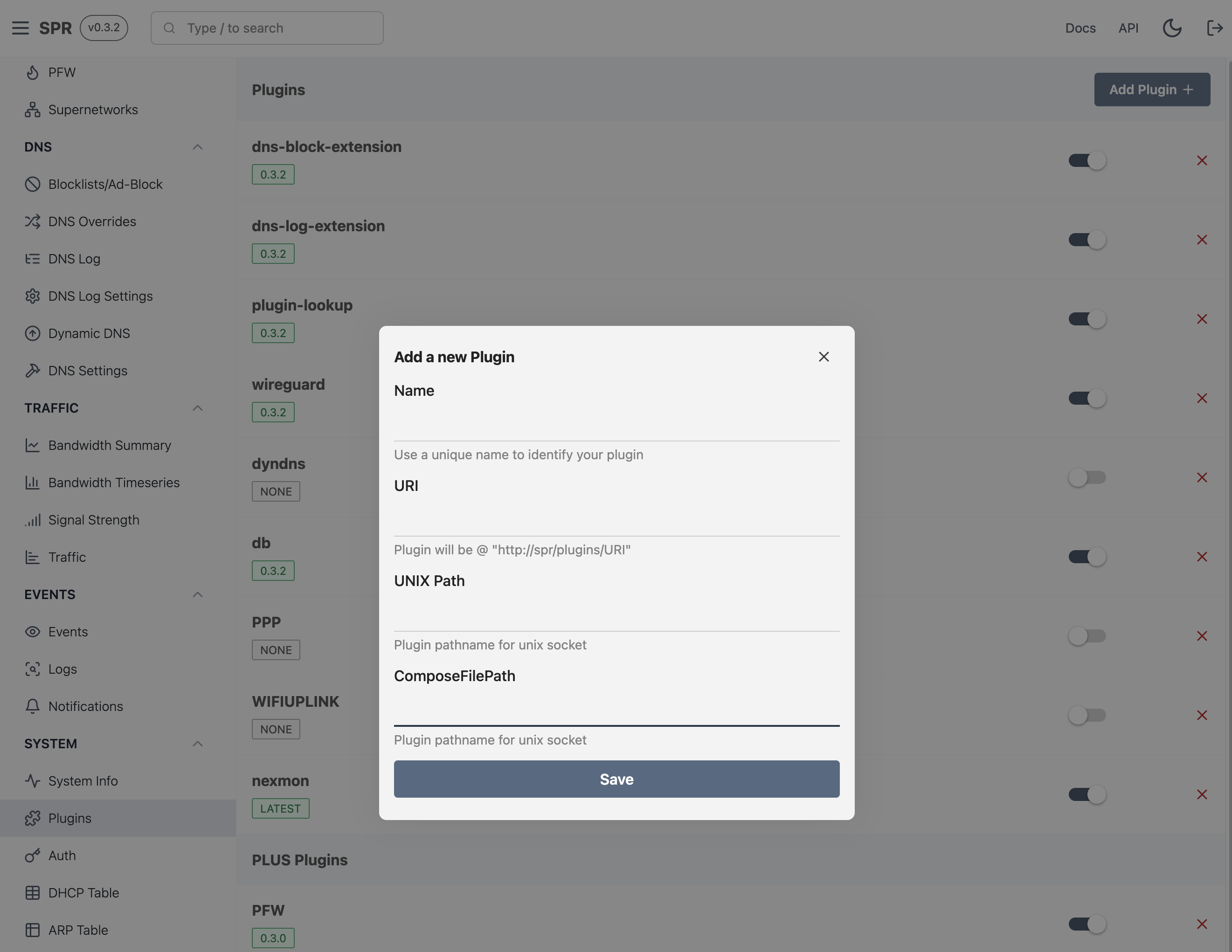
Add you info from plugin.json here and start the plugin by ticking the switch.
Manually adding a plugin:
Add you info from plugin.json to configs/base/api.json under the Plugins key, and whitelist your docker-compose.yml file in configs/base/custom_compose_paths.json:
# plugin location relative to SUPERDIR
PDIR="plugins/user/plugin-name"
cat <<< $(jq '.Plugins += [input]' configs/base/api.json $PDIR/plugin.json) > configs/base/api.json
cat <<< $(cat configs/base/custom_compose_paths.json | jq ". + [\"$PDIR/docker-compose.yml\"]") > configs/base/custom_compose_paths.json
Start your plugin, and restart the api service to update the routes: docker-compose restart api.
Files for plugins
A minimal plugin will need the following files:
- Dockerfile & docker-compose.yml
- plugin.json for plugin info
Dockerfile and docker-compose.yml
Notes on running and building:
- if you need to build code do this in a separate container and copy over the binary
- use the shared container image for running containers:
ghcr.io/spr-networks/container_template:latest
See example Dockerfile for more info.
plugin.json
This is the plugin.json file from spr-sample-plugin:
{
  "Name": "spr-sample-plugin",
  "UnixPath": "/state/plugins/spr-sample-plugin/socket",
  "URI": "spr-sample-plugin",
  "Runtime": "kvm",
  "HasUI": true,
  "SandboxedUI": true,
  "Enabled": true
}
| Key | Description |
|---|---|
| Name | Name of the plugin |
| ComposeFilePath | Optional location of docker-compose.yml relative to $SUPERDIR |
| UnixPath | Unix socket that the SPR API reverse proxies for this plugin |
| URI | Plugin URL segment, exposed at /plugins/URI/ |
| Runtime | kvm for spr-krun, or default for the standard container runtime |
| HasUI | Whether the plugin publishes browser UI code |
| SandboxedUI | Whether the UI runs in a sandboxed iframe; omitted values default to true |
| InstallTokenPath | Optional path under /configs/plugins/ for a backend SPR API token |
| ScopedPaths | SPR API routes authorized for the install token |
| Enabled | Whether the plugin should be enabled |
Runtime isolation
Plugins can use "Runtime": "kvm" to run under KVM with spr-krun. Each plugin then has its own Linux kernel rather than sharing the SPR host kernel as a standard container does. Networking tools often parse attacker-controlled packets and commonly require elevated networking capabilities, so a separate kernel provides a stronger boundary against privilege-escalation and container-escape vulnerabilities.
KVM-capable plugins normally provide a docker-compose-kvm.yml that selects the spr-krun runtime, along with a standard docker-compose.yml when the plugin can also run as a container. SPR checks whether KVM plugin support is ready before installation and can offer the standard runtime when the plugin declares a fallback.
UI isolation and authentication
Plugin UIs are loaded in sandboxed iframes by default. Keep SandboxedUI set to true, or omit the field to accept the secure default. The sandbox prevents the iframe from inheriting the admin page's origin and credentials.
A sandboxed UI receives a short-lived, random plugin session token instead of the user's credential. The session is issued only while the parent SPR UI is authenticated and is scoped exactly to the plugin's /plugins/<URI> route and its child paths. It cannot access regular SPR API routes, other plugins, token management, or WebSockets. SPR checks the scope before proxying the request and removes the bearer header before forwarding it to the plugin's Unix socket.
The parent UI renews the session before it expires. If an API restart invalidates the in-memory session, the plugin detects the invalid_token response, asks the authenticated parent to rekey, and retries the rejected request once. API/frontend protocol mismatches fail closed rather than falling back to a broader credential.
Legacy plugins can set "SandboxedUI": false to run without the iframe sandbox. An unsandboxed UI can use the signed-in user's direct SPR API access, so SPR displays a warning before opening it. This is a compatibility option for trusted legacy code, not the recommended configuration for new plugins.
Backend install tokens
The ephemeral UI session authorizes only the browser's requests to the plugin's own proxy route. If the plugin backend itself needs to call other SPR API routes, declare an install token separately:
{
  "InstallTokenPath": "/configs/plugins/spr-sample-plugin/api-token",
  "ScopedPaths": [
    "/status:r",
    "/firewall/custom_interface:rw"
  ]
}
SPR creates the token during installation and writes it to InstallTokenPath with restricted file permissions. Omit InstallTokenPath entirely when the backend does not use the SPR API. Use :r for read-only routes wherever possible and grant :rw only when the plugin must make changes. Install tokens are backend credentials and must never be sent to the browser UI.
Publish plugin API
If your plugin have an api you can proxy it via spr by setting UnixPath and URI in plugin.json.
Your plugin api should now be available at /plugins/URI/
Publish plugin ui
If you have an ui talking to the api, specify this in plugin.json by setting HasUI: true.
Your ui should now be available at /plugins/URI/index.html.
If HasUI is set to true, your plugin should be listed in the navigation under Custom Plugins.
The UI is sandboxed unless SandboxedUI is explicitly false. Requests from a sandboxed UI to /plugins/URI/ use the ephemeral plugin session described above; the host frontend manages issuance and renewal.
Running and testing
To manually start your plugin:
export SUPERDIR=/home/spr/super # spr root directory
cd $SUPERDIR/plugins/user/spr-sample-plugin
docker-compose up -d
Test if your service is up:
curl --unix-socket $SUPERDIR/state/plugins/spr-sample-plugin/socket http://localhost/test
if you have published your api and have local ui code, see the guide on how to run your ui code in dev mode
Build your code
export SUPERDIR=/home/spr/super/ # spr root directory
mkdir -p $SUPERDIR/state/plugins/spr-sample-plugin
# where your plugin code/repository is located
cd $SUPERDIR/plugins/user/spr-sample-plugin
export DOCKER_BUILDKIT=1
docker-compose build
docker-compose up -d
# verify its running
curl --unix-socket $SUPERDIR/state/plugins/spr-sample-plugin/socket http://localhost/test
curl --unix-socket $SUPERDIR/state/plugins/spr-sample-plugin/socket http://localhost/index.html
Github install
If you have a template for your plugin in a github repository you can use the github install:
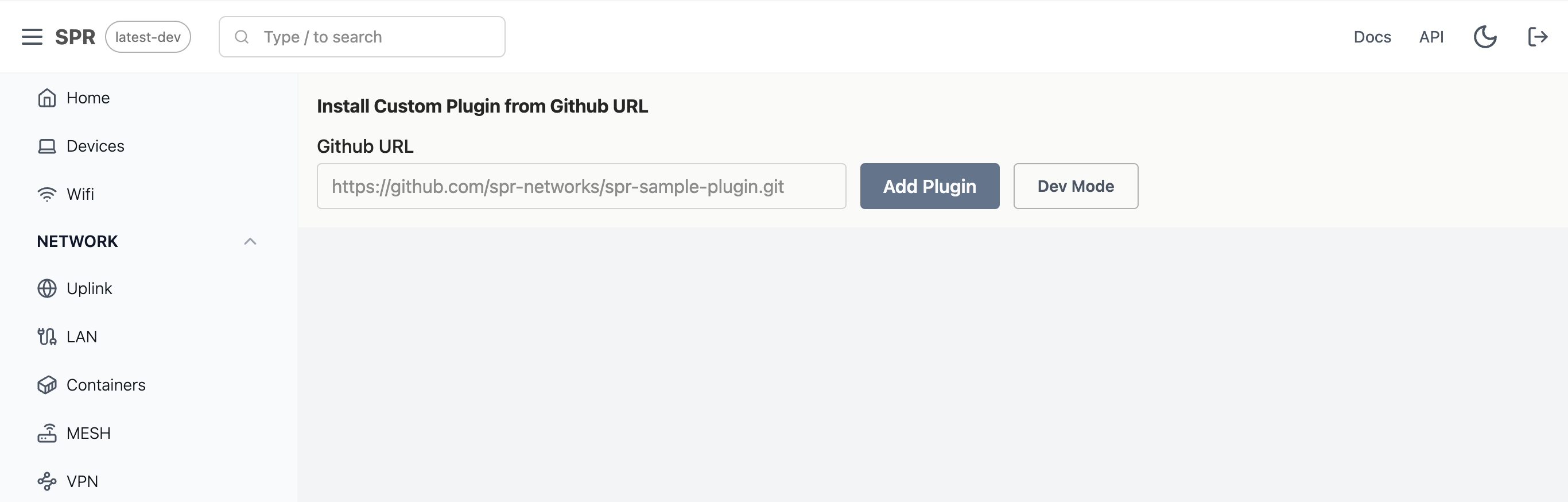
Plugins installed with github install will be located in $SUPERDIR/plugins/user/.