Isolated Plugins and Network Topology in SPR
SPR v1.2.0 adds stronger isolation and network controls to SPR's plugin system. SPR can run plugins with krun, authenticate their UIs, and apply network policy to each plugin. Plugins can also request limited API access and add outbound routes to the network topology.
Networking plugins handle untrusted traffic and often need elevated permissions. These boundaries let them extend SPR without sharing the router's level of access.
Runtime isolation with krun
SPR recommends the spr-krun runtime wherever the host supports it. The Linux kernel exposes a vast attack surface through its networking features, and a virtual machine is currently the best practice for runtime isolation on Linux.
krun provides a dedicated kernel to each plugin, isolating it from the host.
Plugins that support both modes can provide docker-compose-kvm.yml for krun and docker-compose.yml as a fallback on hosts without krun. Both modes use the same container image, so authors do not need to maintain a separate VM image.
Let SPR authenticate plugin UX
Plugin pages open inside sandboxed iframes. When a user signs in, SPR creates a short-lived session scoped to that plugin's route. The session uses its own credential, and SPR proxies requests to the plugin over a Unix socket. Plugin authors can use this flow to keep the dashboard behind SPR's existing login and routing.
Apply network policy to plugins
SPR gives each plugin a network identity. We can apply the same controls that we use for devices:
- Policy
- Groups
- Tags
- Outbound policy routes
For example, we can give a plugin DNS and outbound HTTPS without giving it access to every device on the LAN. The SPR firewall enforces the policy, and the plugin does not need to publish Compose ports or use unrestricted host networking.
Scope plugin access to the SPR API
Some plugin backends need the SPR API to extend network capabilities. The plugin declares each required API path in ScopedPaths and marks it read-only with :r or read-write with :rw:
{
  "InstallTokenPath": "/configs/plugins/spr-example/api-token",
  "ScopedPaths": [
    "/status:r",
    "/firewall/custom_interface:rw"
  ]
}
SPR writes an install token to the declared backend path with restricted file permissions. The backend can read the token, but the browser cannot. Plugins that do not call the SPR API can omit InstallTokenPath.
This makes a plugin's API access visible in its manifest and keeps the token out of its UI.
Example Plugin: USQUE
spr-usque shows how a plugin can extend SPR's topology. It runs the open-source usque client in native TUN mode and provides a Cloudflare WARP route over MASQUE.
The plugin sets HasTopology and reports a live graph from /topology. SPR adds the USQUE gateway and active Cloudflare edge to its network topology. The Policy view below follows one work laptop's outbound route through USQUE.
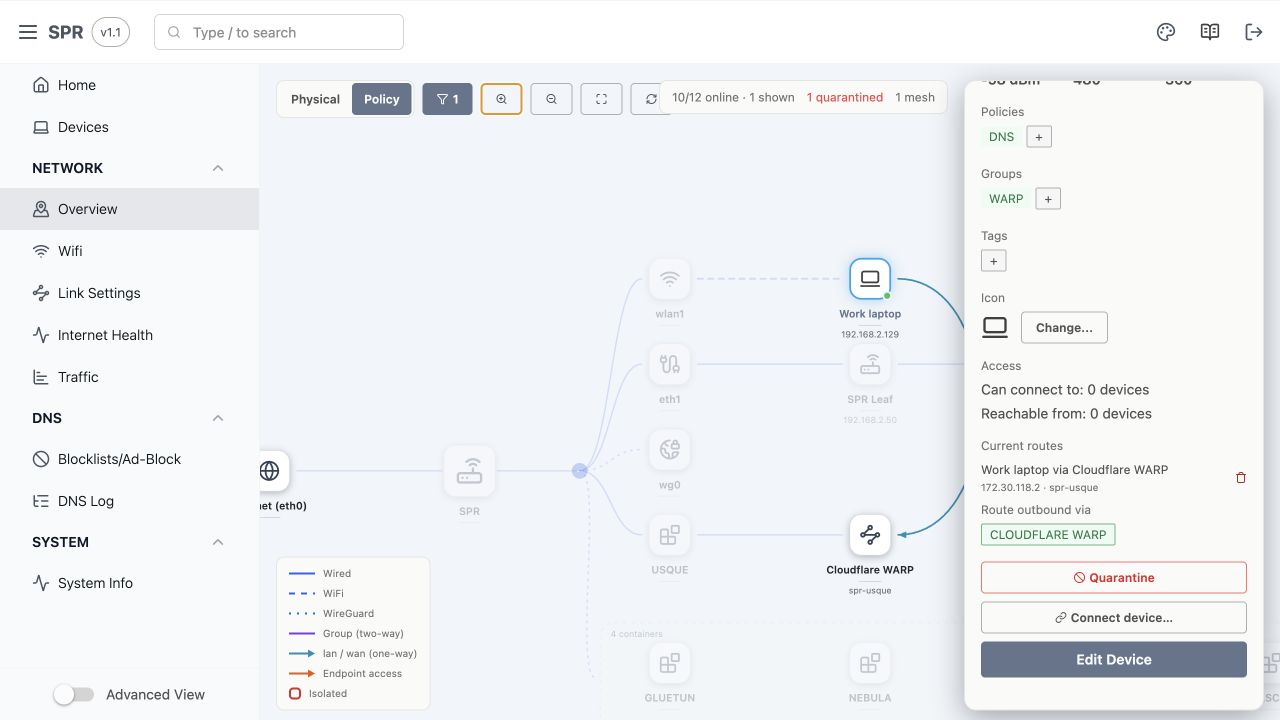
USQUE advertises Cloudflare WARP as an outbound route. We can assign that route to devices or plugin workloads. Their traffic enters the USQUE gateway, crosses warp0, and exits through Cloudflare. The devices do not need WARP software or a SOCKS or HTTP proxy.
The topology shows the Cloudflare exit and the devices or workloads that use it. If the tunnel goes down, USQUE marks the route offline and stops selected traffic instead of falling back to the normal WAN.
Build or install a plugin
A plugin repository needs a Compose configuration, a plugin.json manifest, and optionally a web UI. SPR handles the runtime, UI authentication, request proxying, and network policy.
- Browse the SPR plugin catalog
- Read the plugin security and installation guide
- Start with the plugin development guide
- Submit an open-source plugin to the curated plugin repository