Barely AP is Almost an Access Point
Introducing Barely AP
We've published barely an implementation of a WiFi 802.11 Access Point, using Scapy to teach people about WiFi authentication.
The Turtles WiFi challenges are a series of ctf-style problems concerning network and wifi security skills.
The tasks were a bit challenging, and invovled a combination of WiFi Cracking and exploring how WPA Authentication works, against a custom Access point using Salsa20 instead of AES.
Axel Souchet has kindly shared his writeup with us, which we share below.
The older I get, the more fascinated I have become with the world surrounding me; I ask myself all the time 'how does this thing work uh 🤔?'. It is both fun and rewarding for me to understand the world a bit better. This is also a great way to be constantly humbled by the magic that surrounds us 🌈
Although I enjoy the process of learning how things work, there are millions of things that I interact with daily, that I know so little about; embarrassing.
Heck, how does WiFi work I thought? Because I know that I learn best by getting my hands dirty, I decided to try to solve a few challenges as an introduction. That is why I decided to check-out the March Turtle challenge 🙂
If you want to play at home, you can find the challenges on Github and one the SPR website:
You can participate either directly from your browser via an impressive emulated Linux environment or you can self-host the challenge by cloning the turtles-march-2023 repository and follow the instructions. I chose to self-host the challenges as it made it easier to debug for me.

The MACStealer attack (CVE-2022-47522) published by Mathy Vanhoef demonstrates how attackers can bypass WiFi client isolation by spoofing a victim's MAC address. By doing so, they can intercept queued frames or communicate across security boundaries on the same access point.
Guest networks, multi-PSK setups, WPA-EAP environments, and hotspots are all affected.
The Turtles WiFi challenges are a series of ctf-style problems concerning network and wifi security skills. We first ran a challenge in this style at Stockholm's Midnight Sun CTF Finals in August '22 at the Turtles MidnightSun Finals. You can play along with January's challenge, with the github repository.
January's winner, Amy from Ret2 Systems, has kindly let us share their challenge writeup. Congratulations! And thanks again for putting this writeup together.
February's contest will be released on the 20th and we will be giving out more raspberry pis!
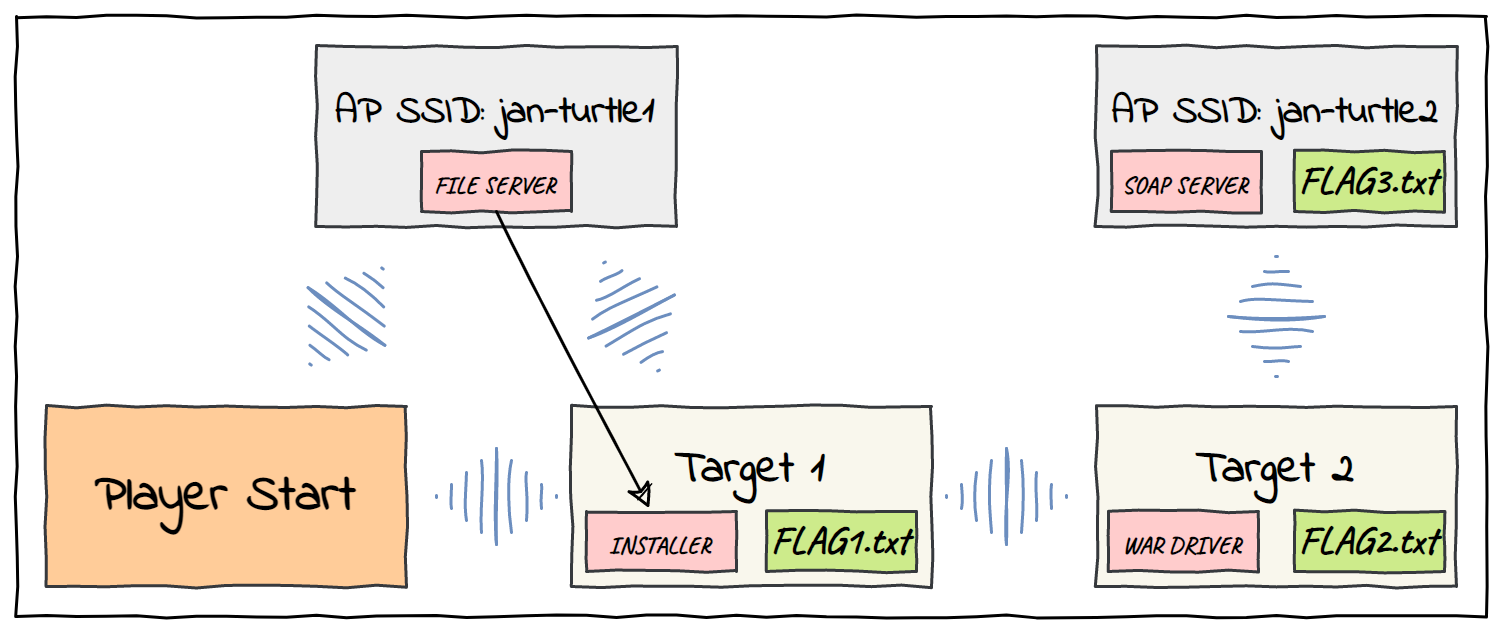
We find ourselves in a twisting maze of WLANs. There are 5 machines connected across several WLAN networks. We start as root on the first machine and must move laterally across the network to exfiltrate 3 flag files. From our box we can connect to an access point with the SSID "jan-turtle1".

This guide shows how to setup a new E2 instance in Google Cloud, allow VPN access in firewall and install Virtual SPR. The result is a private VPN with a custom DNS server able to block ads, log traffic, and more features included in SPR.
For a more general and in-depth guide see the Virtual SPR Guide.
This guide shows how to setup Virtual SPR on a Micro Tier Instance on AWS, and connect to it using WireGuard VPN.
The result is a private VPN with a custom DNS server able to block ads, log traffic, and more features included in SPR.
For a more general and in-depth guide see the Virtual SPR Guide.
This guide shows how to setup Virtual SPR on a DigitalOcean Droplet and connect to it using WireGuard VPN.
For a more general and in-depth guide see the Virtual SPR Guide.
This guide will show how to setup virtual SPR and connect to it using a WireGuard VPN client from your phone or desktop computer.
The result is a private VPN with a custom DNS server able to block ads, log traffic, and more.
Quick install
sudo bash -c "$(curl -fsSL https://raw.github.com/spr-networks/super/master/virtual_install.sh)"
Open WireGuard & scan the QR Code/import config - Done!
Putting together a home network has several subtly annoying security tradeoffs.
Users want
Ease of Use & Connectivity
Maximized by keeping devices maximally connected with a simple passphrase
Privacy and Security
Maximized by keeping devices minimally connected. And ideally offline 🦦
If the goal is a bit of both, how to do segmentation correctly quickly becomes a bit of a puzzle
WiFi nerds and people working on WiFi products have shared their surprise with me a few times now about the integration for multi-PSK with WPA3. This is something already mostly built into HostAP so it should be possible anywhere, although it is not obvious from the documentation. I'm told that most other projects simply don't do it, putting SPR at the head of the pack! In this post I'll share how it's integrated, so that others can benefit from the ideas and improve WiFi security for people all around the world.